Please follow the steps below to pay team fees for your roster in bulk.
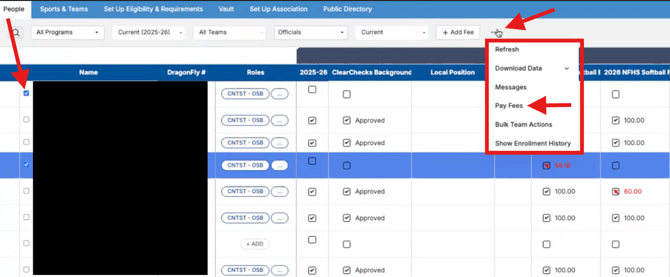
- Go to your People page from the lefthand menu to find who needs their fees paid
- Check the box to the left of the names you want to include in the bulk payment
- Click on the ellipses (three dots) button near the right of the filter options
- Selection the option to 'Pay Fees'
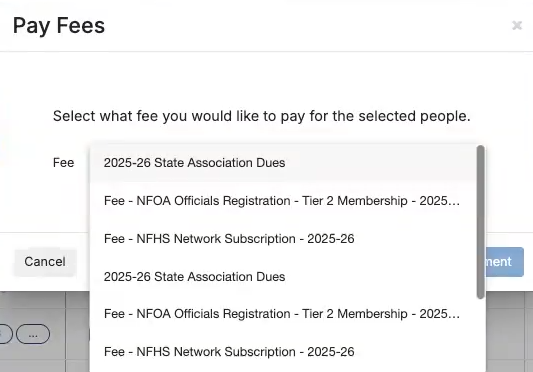
- Select the fee that you want to pay in the Pay Fees pop up
- Please note you can only bulk pay one type of fee at a time
- Once you select your fee, click the button to "Proceed to Payment"
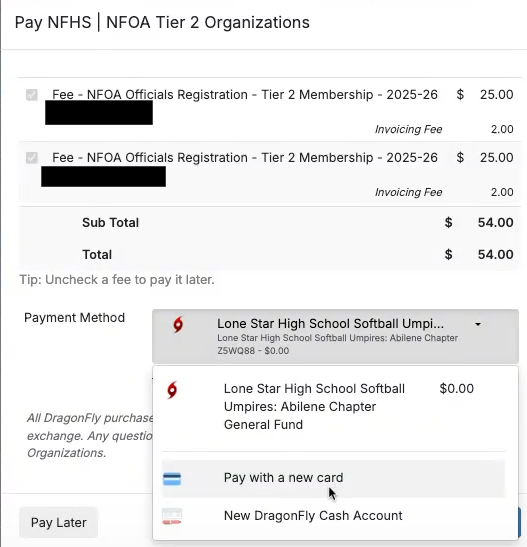
- Choose your payment option and finalize payment
- The next pop up will show an outline of who is getting paid at the top
- You'll see an option for payment method
- You can choose to pay from your school fund or with a credit card
- Once you have set your payment method and review, click the Pay button to finalize the payment