
At DragonFly, your bank account security is a top priority. To ensure your money and financial information are accurate and safe, we have a simple process for adding and verifying a bank account for use with DragonFly. Below are the instructions for verification and a collection of frequently asked questions.
After adding your bank account information, you will need to verify the account twice, once with an initial OTP verification and then a second time with with microdeposits.
OTP Verification
After you click submit to create a new bank account you get a one-time OTP verification code texted or emailed to you depending on how you originally signed up with DragonFly.
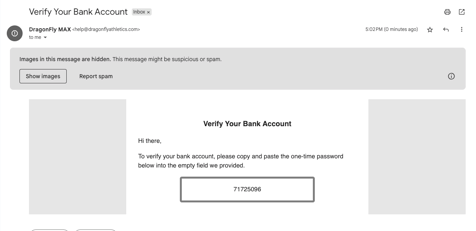
You'll be prompted to input the verification code under the 'My Money' page.
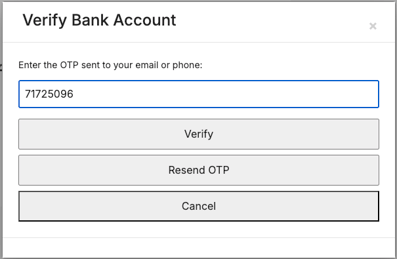
Once the OTP is verified, you'll still need to wait the standard 1-2 business days and verify the microdeposit amounts in order to fully utilize the new account.
If you fail to verify your account by inputting an incorrect code more than 3 times, you will have to wait 15 minutes before you can request a new OTP code.
Accounts that have not been OTP verified will have a warning with a button to bring up the OTP verification box and request a new code or input an existing one.
Microdeposits
First, you will see a banner like the one below. This banner will prevent you from entering microdeposits for 1-2 business days.

The next step is to wait for the microdeposits in your bank account. These two transactions will show up within 1-2 business days.
These deposits will be from 'Dragonfly Athlet Amts' and will be for under $1 each. In the below example, the two deposits are for $0.13 and $0.24. Your deposits will likely be different than the example — the amounts are unique to you for the verification process.

Please note that these transactions will be reversed for the same total amount, so you will eventually see three transactions: two deposits of less than $1 and one withdrawals for the total amount. Below is an example of a withdrawal for the total amount of the two microdeposits, $0.37.

After you have seen the two deposits and the processing window you saw in Step 1 is complete, make note of the two amounts and head back to DragonFly.
Enter The Amounts
Back in DragonFly, return to My Payments. If the date and time window created for you in Step 1 has passed, you will now be able to enter the amounts of the microdeposits. If you still see the banner, please wait until the date and time specified on the banner.
In the below example, the amounts are $0.13 and $0.24. Please note: your amounts will be different than these and will be unique to you for the verification process.
Enter both amounts and click 'Submit Verification'. If the amounts match what was deposited, you will see that your account is now verified and ready for use in DragonFly.

Frequently Asked Questions
What is a microdeposit?
A microdeposit is a small amount of money (less that $1) that is deposited into your bank account then later withdrawn. There will be two microdeposits and a single withdrawal. We use the unique amount deposited into your account to verify that the bank account information entered is correct and that no one is trying to use your bank account without your knowledge.
Why do I have to wait two days to enter the verification amounts?
The wait period is to prevent users from accidentally requesting multiple requests for microdeposits. Placing multiple verification requests results in confusion of which amounts to enter. We recognize that this can be an inconvenience, but it’s a step we have in place to help keep your account secure and to smooth out the process of adding bank accounts to DragonFly.
How much will the microdeposits be?
The amounts of the two microdeposits will be less than $1 each and unique to you. These numbers will likely differ from the amounts others see and from the examples in this article. Keeping these numbers unique is part of of the verification process to make sure your information is secure and no one is using your account without permission.
Why is there a withdrawal after the deposits?
Following the microdeposits there will be a third transaction - a withdrawal for the total amount deposited as part of the verification process. This is normal and not a cause for concern.