
NFHS Official Credential Card
Use this guide to apply for and access your NFHS Officials Credential Card through the
DragonFly and Center for Officials Services (COS) platform.
Steps to Apply:
1. Log in to your COS DragonFly Account.
2. Select Complete My Registration to complete requirements/fees.
3. After fee payment, select the newly populated NFHS Officials Card on your Today Page.
4. Follow the on-screen questions and upload your photo.
5. Click the blue Get My Card button to submit your request.
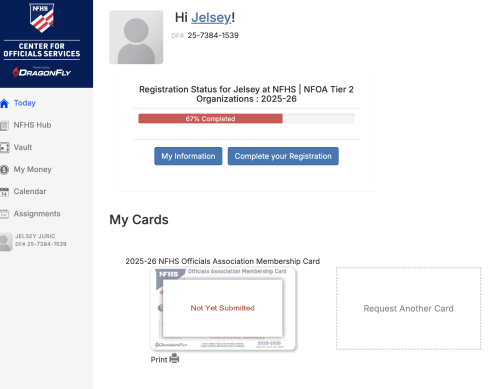
State Association Credential Card
Use this guide to apply for your State Association Credential Card through the COS platform.
Steps to Apply
Steps to Apply:
1. Log in to your COS DragonFly account.
2. Select Complete My Registration to complete eligibility/fees.
3. On your Today page, click Request a Card.
4. Follow the questions and upload your photo.
5. Pay any required fee (if applicable).
6. Click the blue Get My Card button to submit your request.
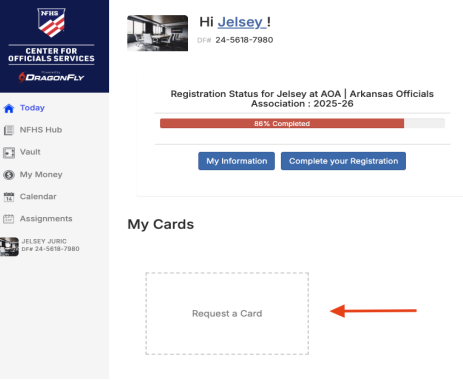
Access Your Digital Membership Card in the Center for
Officials Services (COS) App
Steps:
1. Download the NFHS Center for Officials Services app from the Apple App Store or Google Play Store.
2. Log in with the same username and password used for registration.
3. Tap the Cards tab at the bottom of the screen.
4. Tap your card to view it in full-screen mode.
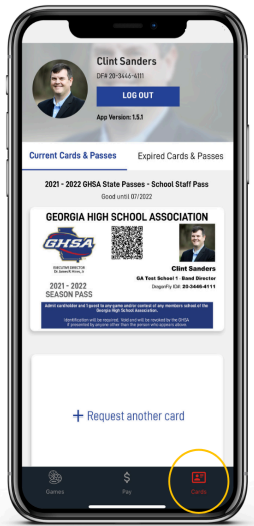
Please note: Approval processes may vary by state association.
For questions or assistance, contact Support@DragonFlyAthletics.com.