
How to Connect to Your Local Association or Assigner Group
-
From your 'Today' screen, click your name in the bottom left corner.

-
Next, click 'My Info' --- this will take you to your profile page.

-
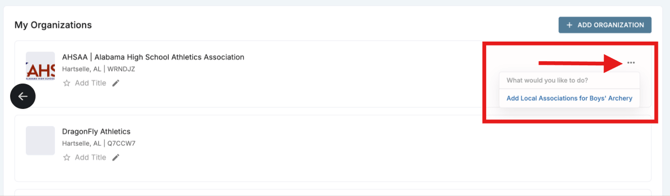
From your profile page, click the 'action button' (three dots) to the right of your state association details
-
Click "Add Assigner Group or Local Association" for the corresponding academic year.

-
Type in the name of your organization.

-
Select the correct name from the list.
***Repeat as many times as needed to add all of your associations.***
How to Remove Yourself from Your Local Association or Assigner Group
1. Follow steps 1-4 above, making sure to click on the three dots next to the local association you wish to remove (not the state association)

2. Select "Remove Local Associations for (sport) 2022-2023"

3. Select "Remove" on the next window to finalize
